File Share app & Pricing Plans Integration
Project Overview
File Share is a Wix app that enables site owners to upload files, organize them into folders, and share them with different audiences such as site members, clients, students, or collaborators.
While File Share already supported advanced permission settings, many users were unaware that they could monetize their content by connecting folders to Wix Pricing Plans app. The goal of this project was to make this capability more visible and accessible within the File Share experience.
By introducing clearer entry points and a dedicated connection flow, we enabled users to easily link folders to paid plans without leaving the product. This created a smoother experience while opening new monetization opportunities for creators.
The Product
The File Share app supports flexible permission settings so that users can control who can view, download, or upload files. It is commonly used for resource libraries, learning materials, project files, and community content. Examples of existing use cases include:
An agency in the UK that builds and manages websites for a network of schools uses File Share to allow teachers to upload lesson materials and organize them by subject or class. Students and parents can access the materials and also upload assignments for review (See screenshot below).
Another example is an ADHD coach who uploads worksheets, guides, and learning resources. Some of the materials are free for members, while others are offered as premium content for paying subscribers (See screenshot below).
In both cases, File Share functions as a structured content library. However, many creators also want the ability to monetize that content.


The Problem
Although File Share already allowed users to restrict folder access based on Wix Pricing Plans, this capability was hidden inside the permissions settings. Many users were not aware that they could monetize their content libraries, and the connection between File Share and Pricing Plans was not visible enough within the product experience.
User conversations revealed that creators who were already using Pricing Plans to sell memberships often didn’t realize they could connect those plans to File Share folders. This meant that a valuable monetization opportunity existed, but was not accessible enough within the product experience.
Main Goal
The goal of this project was to make the connection between File Share folders and Pricing Plans more visible and easier to use. By surfacing this capability inside the File Share experience, we aimed to help creators discover monetization opportunities and connect their content to paid plans without leaving the product.
Design Approach
Our approach focused on surfacing monetization opportunities at the right moment in the user journey. We explored several concepts for introducing the feature more prominently.
One of the most effective ideas was to introduce a banner within the
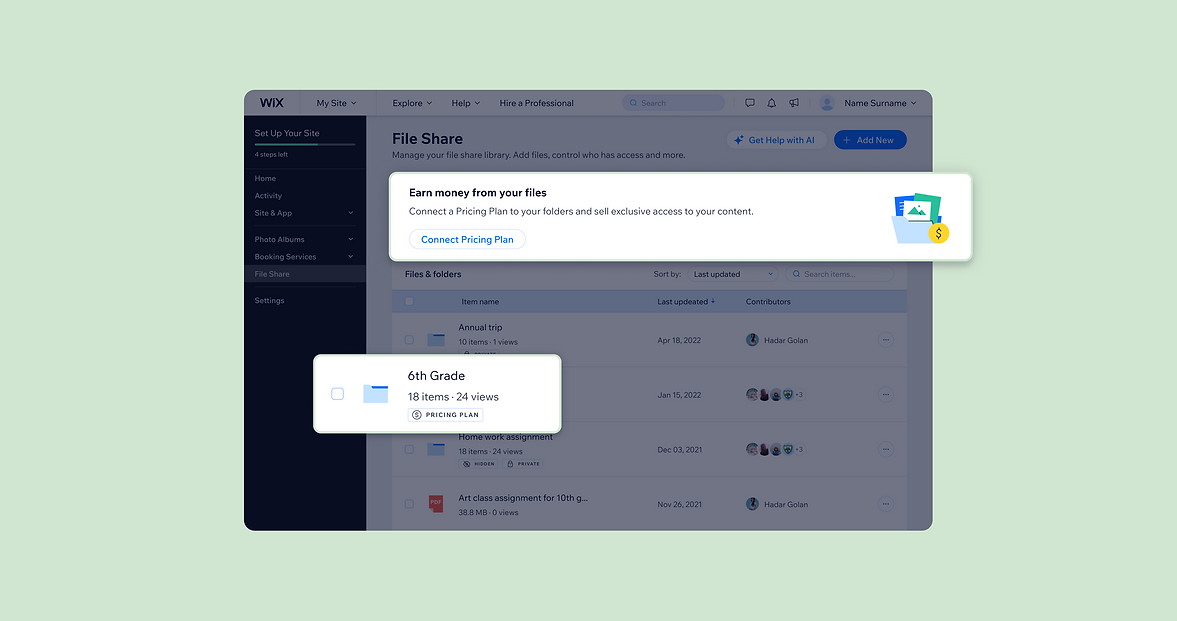
File Share dashboard. The banner acts as an entry point that adapts to the user's setup. If the user already has the Pricing Plans app installed on their site, the banner invites them to connect their folders to Pricing Plans (Image A). If the user does not yet have Pricing Plans installed, the banner instead suggests installing the app in order to start monetizing their content (Image B).
In addition to the banner, we introduced another entry point directly within the File Share table. When users hover over a folder row, a dollar icon appears as part of the row actions (Image C). Clicking this icon opens the modal that allows users to connect the selected folder to a Pricing Plan.
By combining a high visibility banner with an action inside the table, we created multiple discovery paths that support both exploratory users and task oriented users who already know which folder they want to connect to a paid plan.
.png)
The Design Solution
The final interface was designed to make monetization feel like a natural extension of the File Share workflow rather than a separate configuration task. At the top of the File Share dashboard, we introduced a banner that highlights the ability to earn money from uploaded files by connecting folders to Wix Pricing Plans.
The banner uses a clear messaging and a prominent call to action that opens the connection flow modal directly within File Share app. The File Share table remains the core workspace, allowing users to manage their content as usual, while additional monetization actions are seamlessly integrated into the interface.
When hovering over a row in the table, a dollar icon appears. Clicking it opens a modal that allows users to connect a specific folder to a Pricing Plan.
The connection flow itself is presented in a modal, allowing users to select the relevant plan and apply the permission without leaving the File Share environment.
This design keeps the interaction simple and consistent with the existing product patterns, enabling users to monetize their content without disrupting their workflow.
The video below shows the happy flow of the final experience: