Add-location feature

Background
In many parts of the world, farmers are still struggling to improve farming techniques and ensure profitable and efficient crop production. Environmental problems such as pests and diseases, cause significant losses to farmers but are avoidable if using GIS solutions that include crop scouting apps and an easy tool for managing the crop inventory.
The Add location feature, suggested by the Agritask mobile platform, deals with this exact situation. Location is a general name for virtual agriculture elements such as plots/sensors/traps, and they are the very foundation of any farm managing system and particularly Agritask’s. This feature allows managers to create (virtually) plots/sensors/traps directly from Agritask mobile app, and after they do so they can digitally report field measurements, pests & disease, and monitor field activities that are done there.
The Problem
Until this day, the creation of new plots/sensor/traps was made only via the web platform and only by a high-level permission user (farm managers, account managers, and support), so Agritask new users cannot see any real value from the system without close work with an account manager or support engineers.
Moreover, the process of registering, creating, and managing plots in Agritask is not user-friendly, and an accessible tool for this is a long-time request by many of Agritask’s clients.
Solution & Goals
Developing the ability to create new locations and report them in an easy and friendly way from the mobile app, can offer a great value to the users. 2019 agriculture statistics on Mobile vs. Desktop use, give us a good idea of trends, and they all show that mobile use is poised to continue growing and eclipsing desktop use. This trend, in addition to the clients' request, made it very clear that the mobile app development must allow also features that are oriented for farm managers' personas.
The goal of such a feature is to allow users to:

My role & Collaborations
As the only designer in the product team, I collaborated with the product manager and two developers.
Contributions: user research, visual research, Prototyping, UX/UI design.
User stories
During conversations with some customers about the idea of such a feature, the product manager and I have noticed especially to the need of the farm managers to create new locations from Agritask mobile app. Here are some of their rational needs that came up:

User journey
As was mentioned, the creation of new location was made only from the web platform, and a mobile feature was a repeated request by many of Agritask’s clients. As this feature is completely new on the mobile app, my wish was to create a user-friendly experience for both new and exist clients and thus give them the value they were looking for.
New user
After downloading and opening the Agritask application on the mobile, the user encounters a friendly and colorful landing page that welcome him and encourages him to continue, fill in his details and register for the system. Then, before he starts to create his farm, the app will present a short explanation of the next step.

Exist user
In case the user already has an account on the Agritask mobile app, he can press on the map-view on the dashboard and there he has the access to the “Add location” feature.

In order to figure out the scope of my solution, based on the user stories and research, I created a rough story line and started to map out the screens flow:

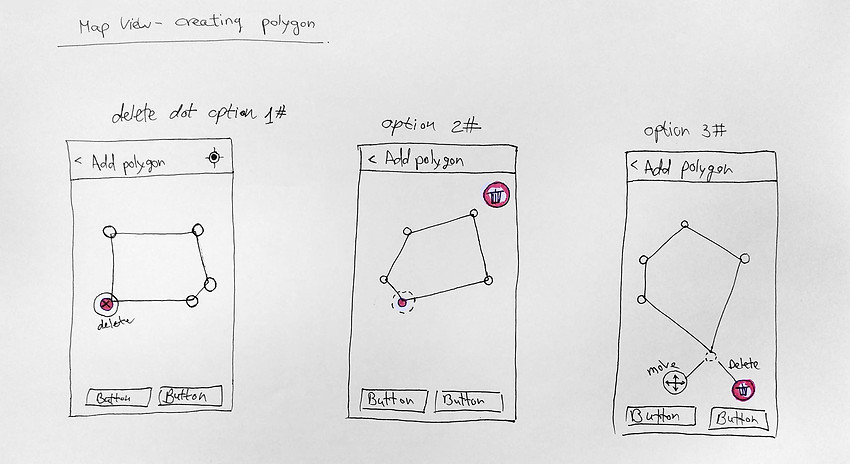
Manual sketches
I usually start the design process with low fidelity sketches. This is a quick way to present many options and ideas that I think of. The flow and screens were already pretty clear after the phases above, so I could jump straight into a quick sketch:

The design solution
In this phase my aim was to create a highly aesthetic and intuitive user experience, keep it simple, and still matched the general style-guide of the company.
My main goal was to make the flow as clear as possible, and give the user a friendly and accessible tool to create their locations.

What's next?
Our next steps include:
- Configure overlapping polygons warning alerts to help avoid user mistakes.
- Add more location types based on different use-cases.
- Support visualization of a plot on the map marked as a single coordinate.
Conclusion
The feature allows users to create new locations from the mobile app which until today was created only from the web platform. This kind of tool was a long-time request by many of Agritask’s clients and I'm glad to be a part of a team that gives the users another solution to their day-to-day work needs.